How We Built Live Transcription
A look under the hood at one of Notability’s most requested features, told by the engineers who made it happen.
TL;DR
- Live Transcription was built to give users value mid-recording, which is especially important for long lectures and meetings.
- Audio is broken into overlapping 3–15 second segments that are continuously uploaded and transcribed, allowing the transcript to self-correct in real time.
- Switching from file system communication to Unix sockets between processes cut latency by ~150ms per segment. This was the key to making transcription feel truly live.
- Handwritten notes sync with audio playback using timestamps assigned to every ink stroke, so your notes reappear in real time as you scrub through a recording.
- Coming soon: timestamp support in Live Transcription, and diarization—the ability to identify and label individual speakers automatically.
There’s a moment every student and professional knows well: you're an hour into a long lecture or meeting, your notes are a blur of half-finished sentences, and somewhere in the back of your mind you're thinking, “I hope I got that part.”
Live Transcription was built for exactly that moment. It's the feature that turns your audio recording into a transcript with words appearing on screen in real time, right as they’re spoken. But getting there wasn't as simple as flipping a switch. It required rethinking how audio moves through a system and making some clever bets on infrastructure that have paid off in a big way.
We sat down with the engineers who helped build it: Jeremy Keys, Backend Software Engineer; Anthony Floccari, Senior Backend Software Engineer; Peter Janosky, iOS Software Engineer; and Jack Leckrone, Web Software Engineer to hear the story.
Starting with a Real User Problem
The seed of Live Transcription was planted by a simple observation: Notability users were making very long recordings, including lectures and multi-hour meetings. With the original transcription feature, they’d have to wait until the whole audio recording was done before seeing any text at all.
“The goal was to give users their transcripts before the audio recording actually finishes,” says Jeremy. “We wanted to provide them value within a few seconds of getting the recording as opposed to having to wait hours or 30 minutes or however long the meeting is to get some value.”
The original audio transcription feature had been championed internally by Colin, Notability’s Chief Business Officer. He and Jeremy laid the groundwork that Live Transcription would later be built on. When the Product team started fielding user requests for a real-time version, the foundation was already there. It was just a matter of figuring out how to make the conversion from audio recording to transcription fast enough to feel truly live.
The Architecture: Thinking in Chunks
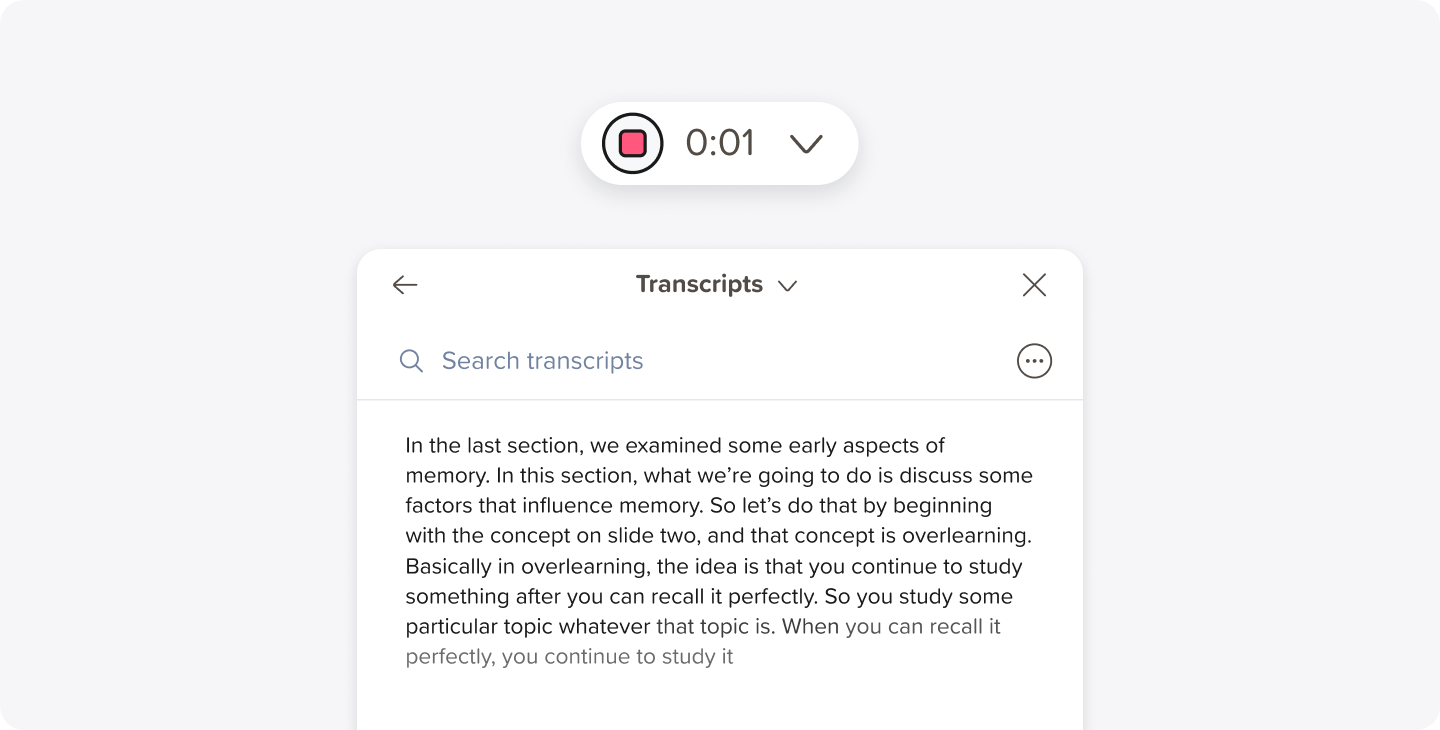
To understand how Live Transcription works, it helps to understand the architecture of the original feature. Basic transcription was straightforward: a user records audio, Notability sends one big file to the server at the end of the recording, and the user gets a transcript back.
Live Transcription required a fundamentally different approach. Instead of one big file, the audio is sliced into small segments of just a few seconds each that are continuously uploaded and transcribed as the recording progresses.
“We chunk the audio files into little segments and we send up those little segments and transcribe those,” Jeremy explains. “And the segments can actually be overlapping.”
That overlapping detail is what gives Live Transcription one of its most satisfying behaviors: the self-correcting transcript. If you've used the feature, you've probably noticed the text occasionally adjusting itself as you go. Each new segment is transcribed with a small window of overlap from the previous one, so the system can double-check its earlier work and quietly fix any mistakes. It's a lot like how we naturally re-read a sentence when something feels off. The software is essentially doing the same thing, constantly.
Racing Against Latency
For live transcription to feel live, each audio segment needs to be transcribed in a matter of milliseconds. Any longer, and the feature starts to feel like it's lagging behind reality.
“We’re transcribing segments of audio that are 5 to 15 seconds long, maybe even a little shorter than that, maybe 3 to 4 seconds,” Jeremy says. “So we need to transcribe this audio very, very quickly, within a couple hundred milliseconds. Otherwise, the latency starts to feel less like live transcription and more like live-ish transcription.”
The initial implementation was close, but not close enough. The bottleneck? The file system. In the original design, audio data was written to a file on disk, which the transcription process would then pick up and process. It worked, but the act of writing and reading files introduced too much lag.
The solution was to remove the file system from the equation entirely and have the two processes talk directly to each other using Unix sockets, a communication method that keeps everything in memory. This resulted in savings of roughly 150 milliseconds per segment. It might sound small, but across thousands of users and millions of segments, those milliseconds add up fast, both in user experience and in the overall responsiveness of the system.
Another challenge the backend team faced was handling variable latency, and the subsequent variable audio segment lengths. Transcription latency means the best effort, and “tail latency,” the latency of the slowest requests, can mean that individual segments rarely take upwards of a second to process. As a result, the backend infrastructure needed to be resilient to Notability sending variable length segments.
To address this, Anthony devised a system in which the team utilized a monotonically ascending high watermark they called the “chunk index,” which points to the totality of what the team considers “verified” transcription. Any audio after that can be re-sliced by Notability, with the additional audio that has been accumulated since the last request, and sent to the server for re-transcription. This is how the transcript evolves over time, repairing itself as it gains more context with each segment.
The Engine Under the Hood: Whisper
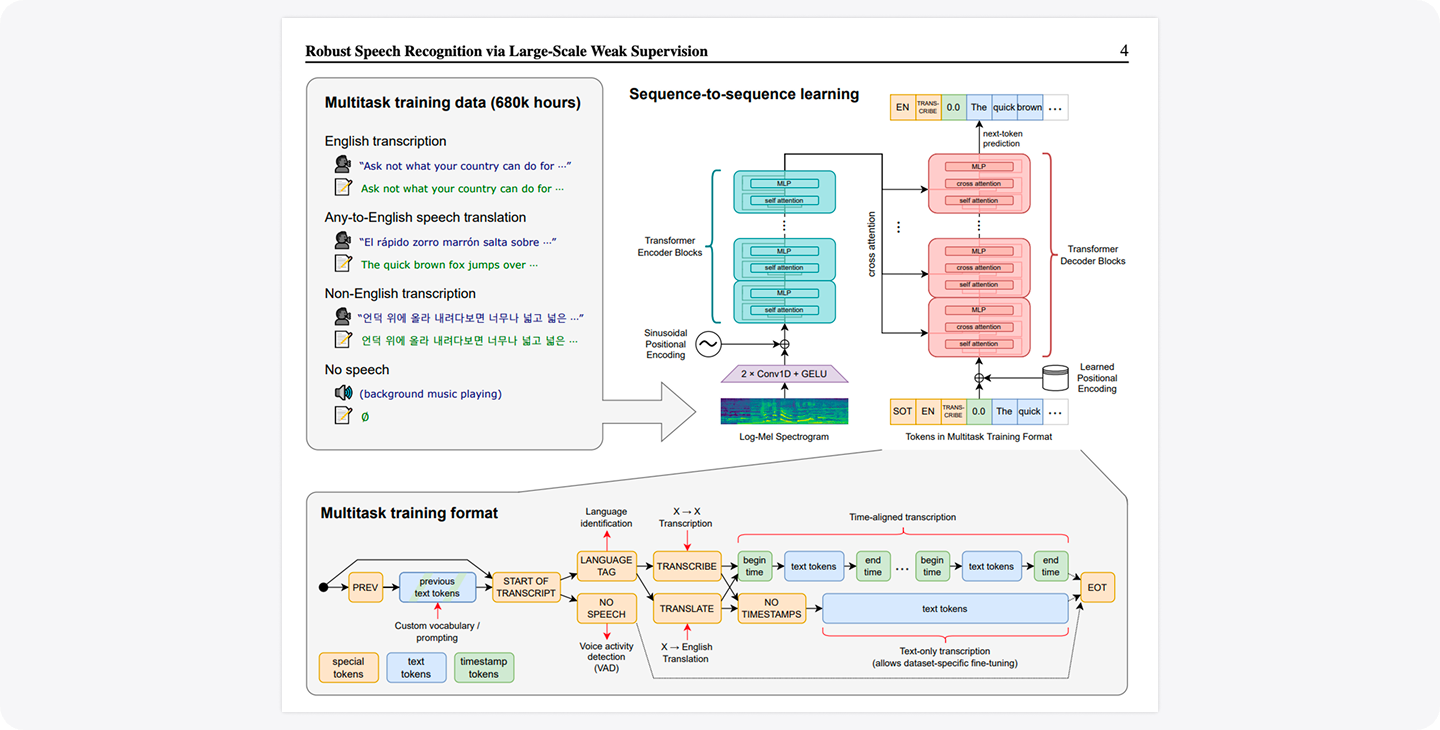
At the heart of both Live Transcription and basic transcription is Whisper, the speech recognition model released by OpenAI. Notability’s audio pipeline is tuned specifically for Whisper's requirements: audio is resampled to 16 kHz (16,000 samples per second), which is precisely what the model expects to receive.
One of the trickier balancing acts in building Live Transcription was choosing the right version of Whisper to use. Speech recognition models come in different sizes. Larger models are more accurate, but they take longer to run. Smaller models are faster, but they make more mistakes.
“We thought very carefully about what is the smallest model we can use that'll satisfy this need for the majority of our users,” Jeremy explains. “Because the smaller the model is, not only does it save us money, but it means that we can get the results to users faster.”
The team continues to evaluate the speech recognition landscape as it evolves, keeping a close eye on newer models that could offer meaningful improvements in speed and accuracy. Most recently, the team rolled out a model upgrade for English audio, in both the Automatic Speech Recognition and Live Transcription services, to reduce the amount of missing segments caused by low quality audio, hard-to-follow or overlapping speech, and more.
Scaling with Sessions, Not CPUs
Most cloud services scale based on how hard the servers are working: CPU usage, memory consumption, network load. Live Transcription does something a little different.
“The way we autoscale for Live Transcription is we keep count of the number of connected sessions,” Jeremy explains. “We have our scheduling software divide that by the number of sessions we think each server can hold to get the number of servers that we should have.”
In practice, that means if 3,000 users are actively transcribing and each server can handle 30 sessions, the system spins up 100 servers automatically. When users disconnect, servers spin back down. It’s an elegant approach that keeps performance consistent regardless of how many people are recording simultaneously.
Anthony also contributed a key optimization here: sticky sessions. When a user connects to the cluster of servers, sticky sessions ensure that every subsequent request from that user goes to the same server. This means the audio data can live locally on that server rather than being retrieved from a shared store each time, meaningfully reducing transcription latency.
The User Experience: Fast, Quiet, Unobtrusive
While Jeremy and Anthony were solving the backend puzzle, Peter Janosky and Jack Leckrone were tackling the iOS and Web side of the equation. Their guiding principle was refreshingly human: don’t get in the way.
“We wanted Live Transcription to be a helpful resource during lectures and meetings, and not distracting,” Peter says.
Making that happen required careful collaboration with the design team, who met with engineering every week to iterate on everything from scrolling animations to loading indicators. One insight that emerged from those conversations shaped how Smart Notes are generated: notes appear in rapid succession at the beginning of a recording, then space out gradually as the session progresses. The reasoning is intuitive. The start of a recording is when context is being established, so delivering information quickly matters most.
For the web app, the team landed on a ‘typewriter” effect for incoming transcript text, where the last few words of each chunk animate in one at a time with a short fade-in. “This gives users a clear visual signal that the system is actively processing and not frozen,” Jack explains.
They also built a tiered loading message system for the buffering period at the start of a recording, before the first transcripts come back. The message shifts from “Starting transcripts” to “Analyzing transcripts” to “Hold tight” based on how much time has elapsed. Auto-scroll behavior got similar attention: the transcript only scrolls automatically when the user is already near the bottom. If they've scrolled up to reread something, the app leaves them alone.
For encoding and uploading performance, Peter built the iOS implementation on AVFoundation, Apple’s native media processing framework. And to keep memory usage lean, only a few seconds of audio data are loaded into memory at any given time during upload—a small but important detail for battery life and performance across a wide range of devices.
On the web app, resource efficiency was a priority from the start. Jack built a dynamic cadence system that tracks how long each audio upload actually takes and adjusts the frequency of chunk uploads accordingly. On a slow connection, the system naturally backs off rather than overwhelming the network. When a recording ends, careful teardown logic disconnects media streams and clears any lingering overhead, making sure nothing keeps running in the background that could quietly drain the battery.
Perhaps the most subtle challenge was handling race conditions during teardown. Jack implemented a cleanup flag that prevents the upload loop from firing after the user has already stopped recording—a small guard that keeps the system from doing work it has no business doing anymore.
Syncing Notes with Audio: Smarter Than It Looks
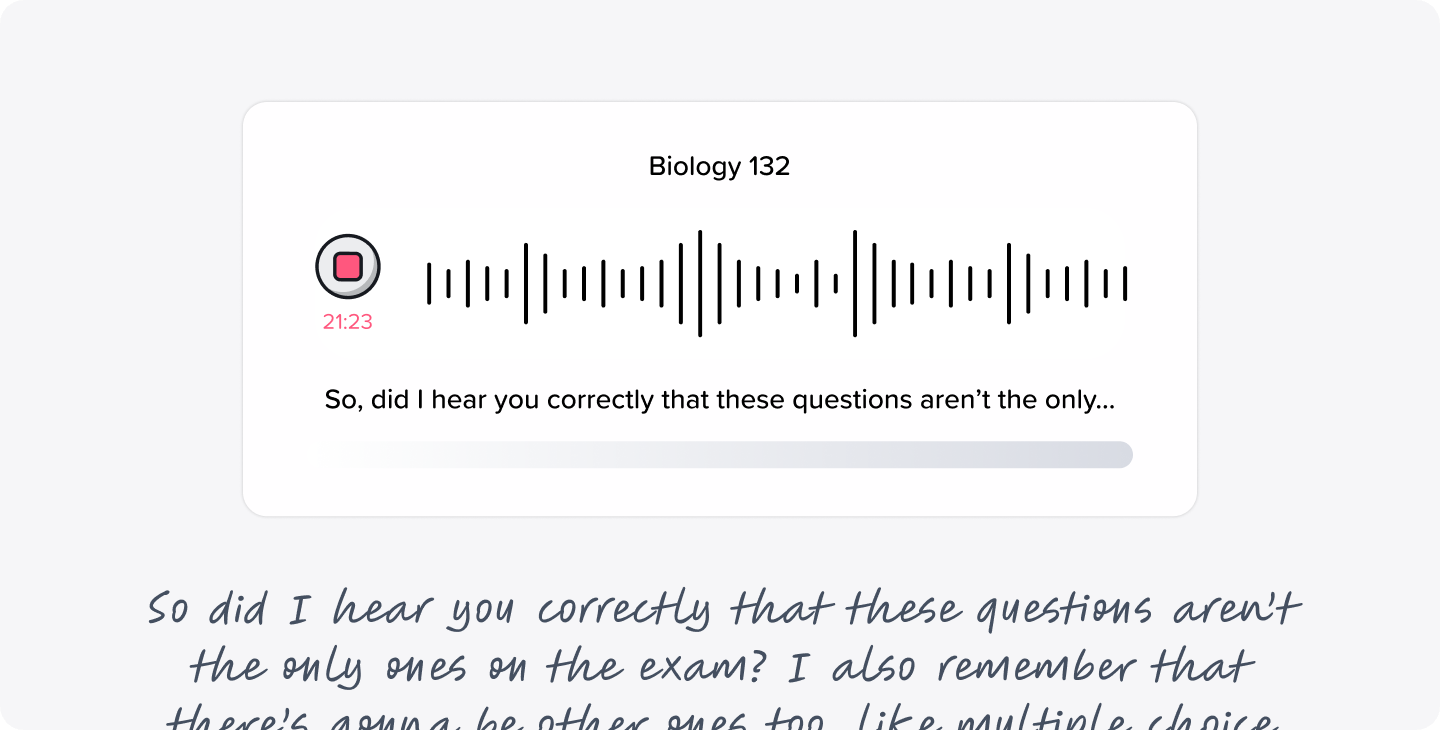
One of Live Transcription's more delightful behaviors is the way it synchronizes with handwritten notes during playback. When you scrub back through a recording, your ink strokes appear and disappear in sync with the audio, as if you're watching your own note-taking in real time.
The mechanism behind this is elegant. Every edit to a note and ink stroke is assigned a timestamp when it's created. During playback, the app simply checks: “What time is it in the recording right now? Render everything that existed before that moment.”
“If the application knows when the handwritten strokes were recorded, it can just say, ‘Okay, I'm at minute three of the transcription. Render all the ink that had been created before minute three,’” Jeremy explains. The audio transcription output provides start and end timestamps for each segment of text, making the pairing between spoken words and written notes precise.
What’s Coming Next
The team has a clear vision for where Live Transcription goes from here. First, timestamps. Currently, Live Transcription doesn’t include the timestamp data that the basic transcription feature uses to enable the “jump to” navigation feature. Adding that to the live pipeline would bring feature parity and make the experience even more powerful.
Second, and more ambitiously: diarization. Right now, the system converts speech to text. It doesn’t know who is speaking. Diarization is the ability to assign segments of audio to individual speakers, labeling them as “Speaker 0,” “Speaker 1,” and so on. Users could then manually map those labels to real names.
“You can even imagine a hypothetical future scenario where an AI figures out the name based on the context of the conversation,” Jeremy muses. “If the voices mention something like, ‘Jane, how are you doing?’ and then the Speaker 1 responds, then the model could deduce that Speaker 1 is Jane, for instance.”
It’s the kind of feature that would make Notability feel less like a recorder and more like a smart collaborator that pays attention to who said what.
Building Something Worth Being Proud Of
Looking back, Jeremy reflects on how the project shaped the way he and Anthony approach collaboration. “Anthony did a lot of the session management code and I did more of the transcription side," he says. “I was able to work with Anthony and that helped me learn how to divide and conquer work more effectively for larger tasks, and how to specialize on the things that we were most skilled at.”
It's a fitting note to end on. Live Transcription, at its core, is a feature built around the idea that technology should quietly handle the hard parts so people can focus on what matters: the conversation, the lecture, the idea being shared. The engineering that powers it is fast, resilient, and thoughtfully crafted. And it's only getting better.

.png)